Summary
Dedicated Model Inference on the Together AI platform consists of three parts: the endpoint (a stable name you or your clients call), deployments (specific model + hardware combinations running replicas behind it), and configs (recipes for how a model runs). A capacity-aware traffic split ties these three entities together. This architecture enables various other features such as rollouts, A/B tests, shadow experiments, zero-downtime changes possible. Below we'll show how capacity-aware routing works against a live endpoint with measured traffic.
How the resource model works
- A config is a recipe that specifies the engine, the GPU type and count as well as the parallelism and optimization profile (throughput, latency, balanced). Configs are immutable and every config has an ID like
cr_.... Your deployment always points at exactly the config that was tested. - A deployment binds one model (at a specific revision) to one config, gives it an autoscaling policy, and runs replicas. Deployments are disposable on purpose and creating and destroying should be considered routine.
- An endpoint is a fixed identity: a qualified name (
<project_slug>/<endpoint_name>) that your applications pass as themodelparameter in the ordinary inference API. The endpoint has a traffic split which is used to determine request routing over its deployments.
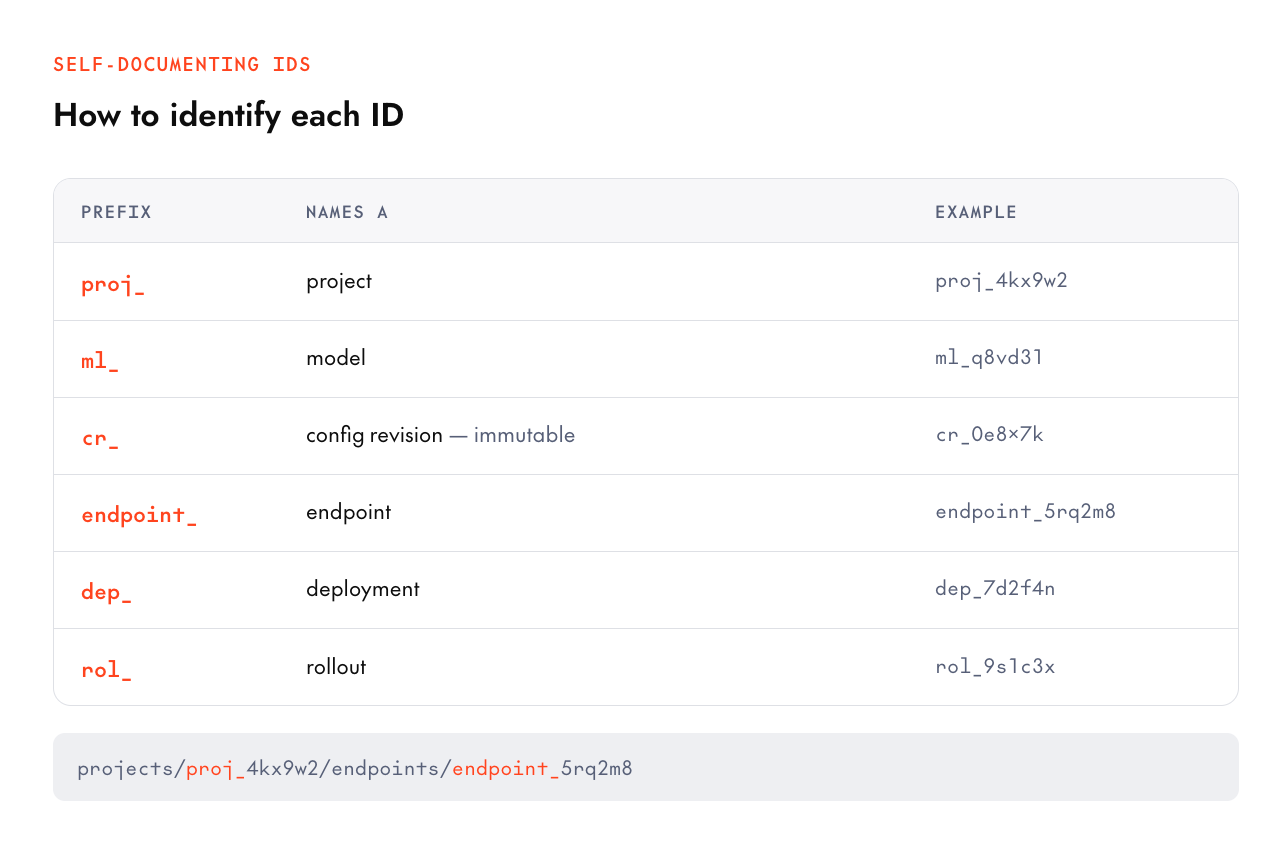
One easy way to understand this is by referring to the ID, every ID in the system tells you what it is by prefix, which makes logs and scripts self-documenting: proj_ (project), ml_ (model), cr_ (config revision), endpoint_, dep_ (deployment), rol_ (rollout).
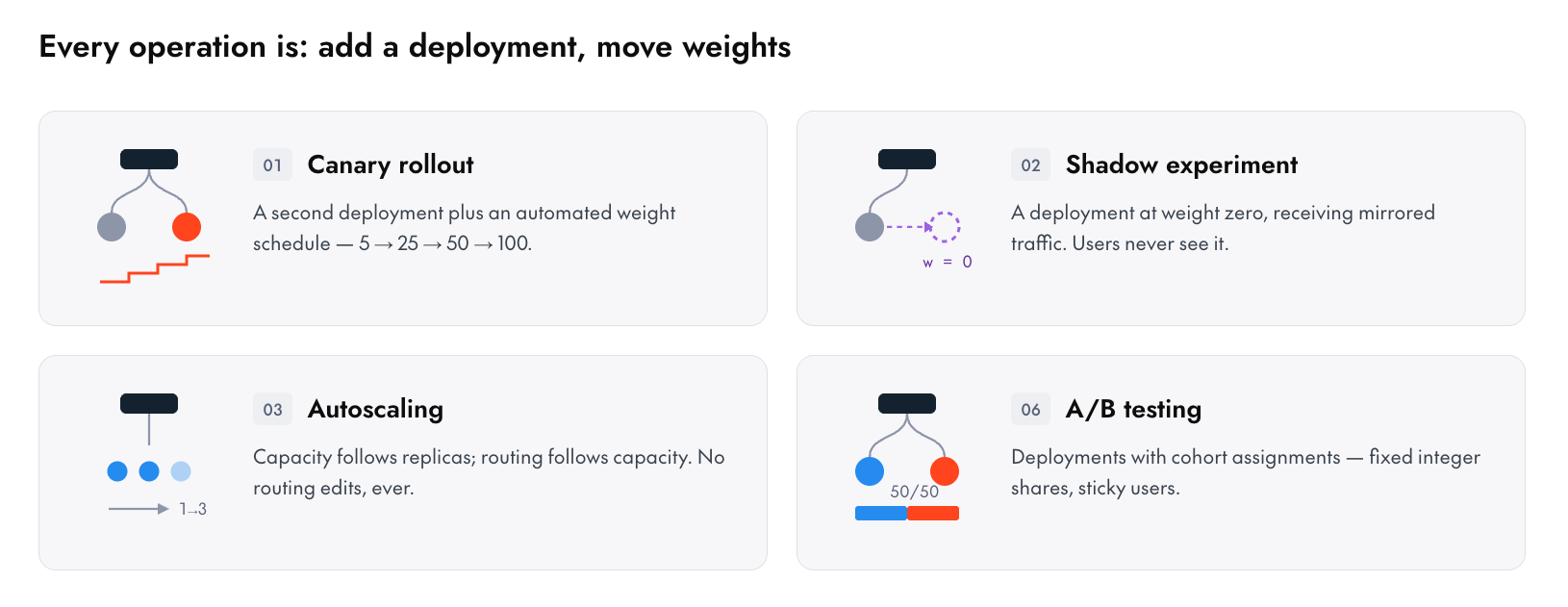
Every advanced operation in the platform is just "add a deployment, and assign it a traffic routing weight" An A/B test is deployments with cohort assignments. A shadow experiment is a deployment at weight zero receiving mirrored traffic. Stopping a deployment is bounding min and max replicas to 0/0.
Weight based traffic split
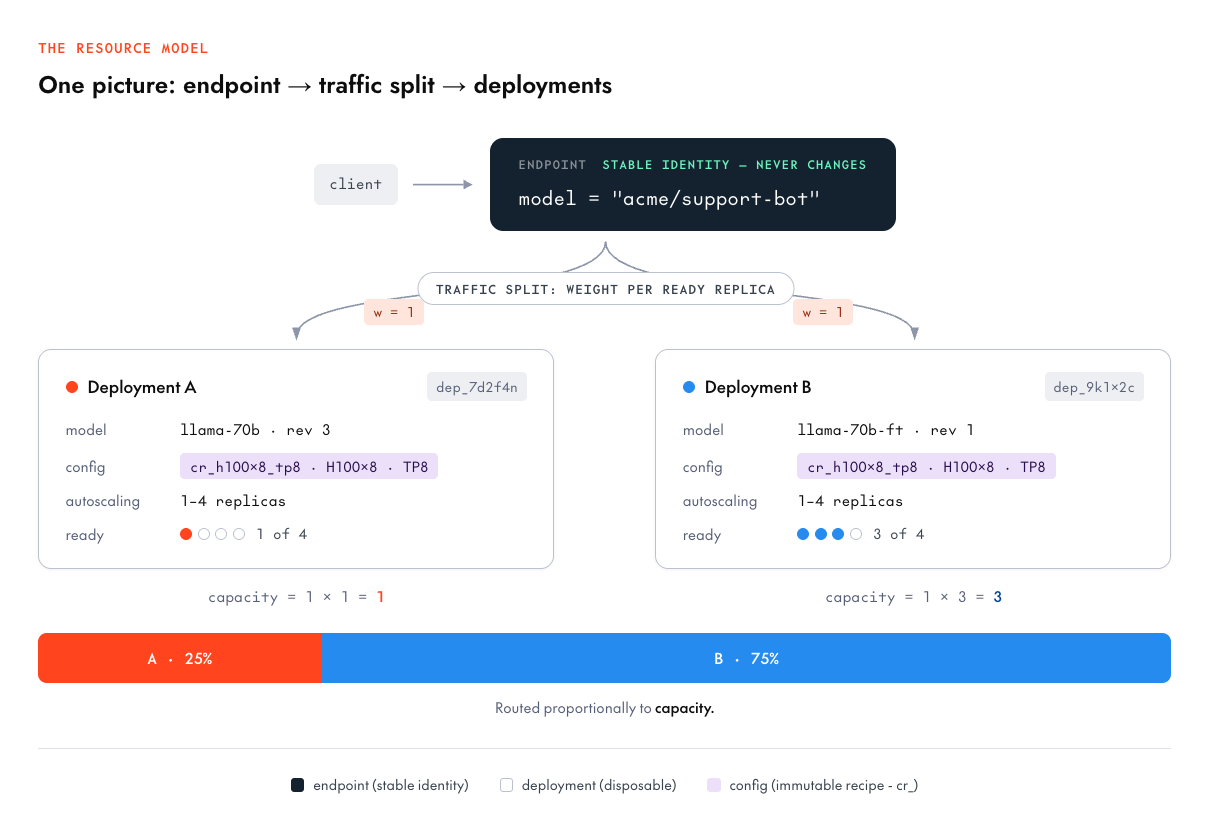
The traffic split is a list of {deployment_id, weight} entries where a weight is per ready replica**.** The router computes each deployment's effective capacity as weight × ready_replicas and routes proportionally to this capacity.
Walk through the diagram above: both deployments have weight 1 but deployment A has 1 ready replica (capacity 1), deployment B has 3 (capacity 3), so traffic follows a 25%/75% split. Equal weights mean equal per-replica load, not equal traffic share.
We designed it this way because it makes routing and scaling the same conversation:
- Autoscaling composes for free. When deployment A scales from 1 replica to 3, its capacity triples and it automatically absorbs proportionally more traffic. With naive percentages, a deployment pinned at "25%" would saturate when scaled down and be idle when scaled up.
- Per-replica load is what you control. Weight 1 vs weight 2 says "each replica of B should work twice as hard as each replica of A"
- Replicas that aren't ready don't count. A deployment mid-cold-start, or degraded to 0 ready replicas, contributes zero capacity, so traffic flows to what can actually serve.
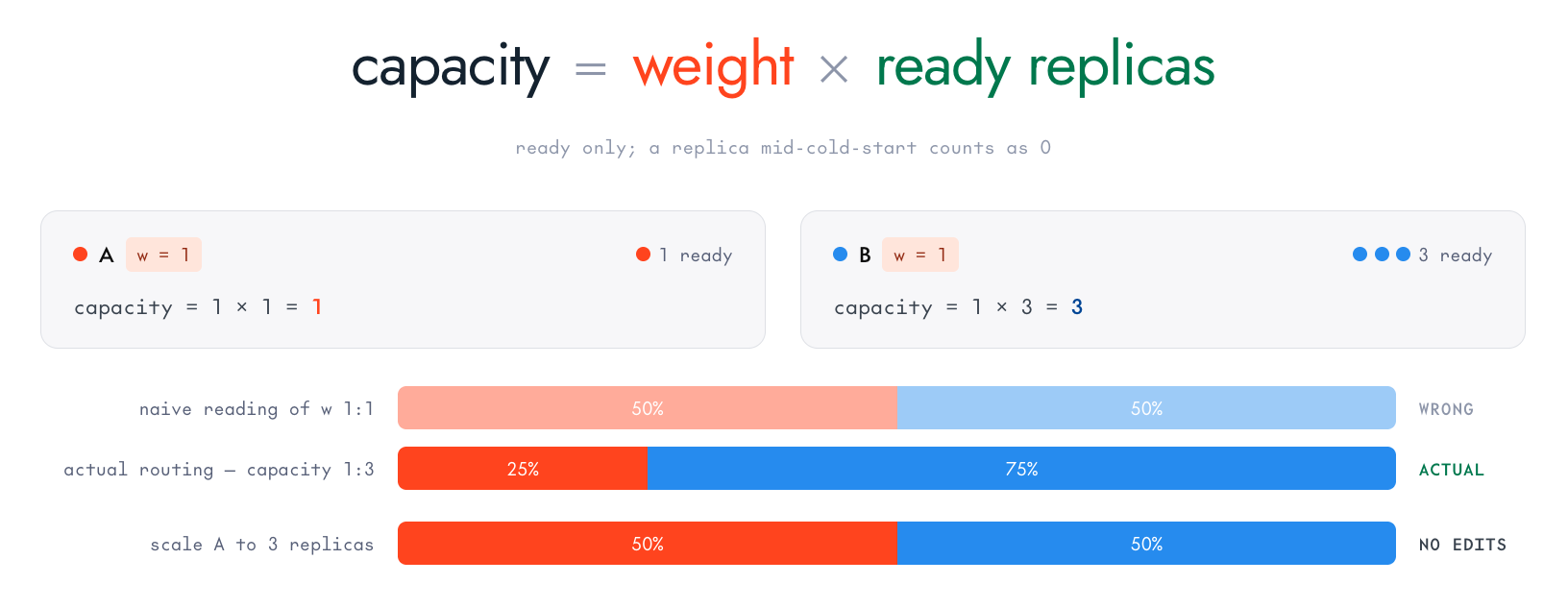
Weights are positive numbers with no sum constraint so 0.7/0.3 and 700/300 describe identical routing. If you want fixed traffic shares regardless of replica count you can setup A/B experiment cohorts which allow for integer percents that sum to 100%.
Setting a split is one PATCH with a field mask:
      tg beta endpoints update $DEPLOYMENT_A --traffic-weight 1
tg beta endpoints update $DEPLOYMENT_B --traffic-weight 1

# take a deployment out of rotation without scaling it down
tg beta endpoints update $DEPLOYMENT_B --traffic-weight 0
Under the hood: choosing a config
You don't need to write configs from scratch. Every model in the supported-models catalog ships with deployment profiles which are certified model + config pairs we benchmark and continuously improve:
      tg beta models public zai-org/GLM-5.2 --json | jq '.data[0].deploymentProfiles[]'

# or, once you have the model ID, list its deployable configs directly:
tg beta models configs ml_CcEtnFUbitJYNja6TTR6U
{
  "profileId": "profile-cabcbcec874c",
  "certifiedConfigRevisionId": "cr_Cd35DNpQuHM3RihtCkN59",
  "certifiedModelRevisionId": "rv_CcEuPu4Gk6c4M7v4PTYuG",
  "gpuType": "NVIDIA-B200",
  "gpuCount": 4,
  "quantization": "FP4",
  "performanceBenchmarks": {},
  "config": "projects/proj_CbdXDuLRFhUPv1mGfxwUc/configs/cr_Cd35DNpQuHM3RihtCkN59",
  "model": "projects/proj_CbdXDuLRFhUPv1mGfxwUc/models/ml_CcEtnFUbitJYNja6TTR6U/revisions/rv_CcEuPu4Gk6c4M7v4PTYuG",
  "parallelism": "TP4"
}
From there you can copy the model and config resource names into a deployment create:
      tg beta endpoints deploy zai-org/GLM-5.2 \
  --endpoint my-glm-endpoint \
  --config cr_Cd35DNpQuHM3RihtCkN59 \
  --traffic-weight 1
When you're choosing between configs, the selectors tell you what each recipe optimizes:
| Selector | Values | The tradeoff it encodes | ||
|---|---|---|---|---|
| accelerator_type | H100, H200, B200, … | Cost vs memory bandwidth vs availability | ||
| accelerator_count | 1, 2, 4, 8 | Fit the model + KV-cache headroom | ||
| optimization | latency / throughput / balanced | The fundamental serving tradeoff (below) | ||
| topology | e.g. aggregated/disaggregated | How the model splits across GPUs |
The optimization axis is the one you'll spend the most time choosing between.
- A latency profile optimizes for time-to-first-token: smaller batches, eager scheduling, each request gets attention sooner, at the cost of total tokens/sec per GPU.
- A throughput profile packs bigger batches: maximizing aggregate tokens per GPU-hour, and individual requests wait a bit longer to join a batch. If you’re building an interactive chat you probably want to go with latency whereas offline pipelines and batch summarization can use a throughput config.
- balanced is a good default when your traffic has both.
Configs are immutable because cr_ revisions never change, i.e. a deployment's behavior can't drift because someone "just tweaked a flag" on a shared config. A change is a new revision; the old one remains a valid, tested rollback target. Speculative decoding can be triggered from here too because a draft model is a property of the config.
Edge cases
1. A deployment is in the split but has 0 ready replicas.
Because capacity = weight × 0 = 0 it receives no traffic; other deployments will absorb its share. When replicas recover, traffic flows back automatically and proportionally.
2. Can I delete a deployment that's still in the traffic split?
You should remove it from the split first, then delete. The teardown sequence consists of drain traffic → stop → delete, and the API will push you towards that order.

3. Traffic splits vs. A/B member percents vs. canary step percentages
traffic-split weights (capacity-relative, steady-state routing), A/B member percents (integer cohort shares, sum to 100 and are fixed regardless of replica counts), and canary step percentages (a rollout's transition schedule). These are three different tools for three different jobs and they compose in a fixed order: routing first resolves the weight split (a candidate deployment sampled by capacity), then an A/B experiment re-samples if the candidate is its control (subdividing the control's share among the arms), then an active rollout re-samples if the candidate is its source (splitting between source and target by the current step percentage) and finally a cluster is chosen inside the winning deployment. A rollout manipulates its stage on your behalf.

4. What is the name my clients use?
The endpoint which looks something like: <project_slug>/<endpoint_name> can be passed as a model string in the standard inference API. This will stay the same even if you choose to perform a rollout, swap hardware, run A/B tests.
Experiment showing capacity-aware routing
We ran this against a live endpoint with two single-H100 deployments to show the weight model traffic split in action. Two deployments each with weight 1 and each starting with 1 ready replica. We sent 599 tagged requests and attributed each to its serving deployment, then scaled A from 1 → 2 replicas and sent 599 more requests and the following routing was captured as seen by the deployments:
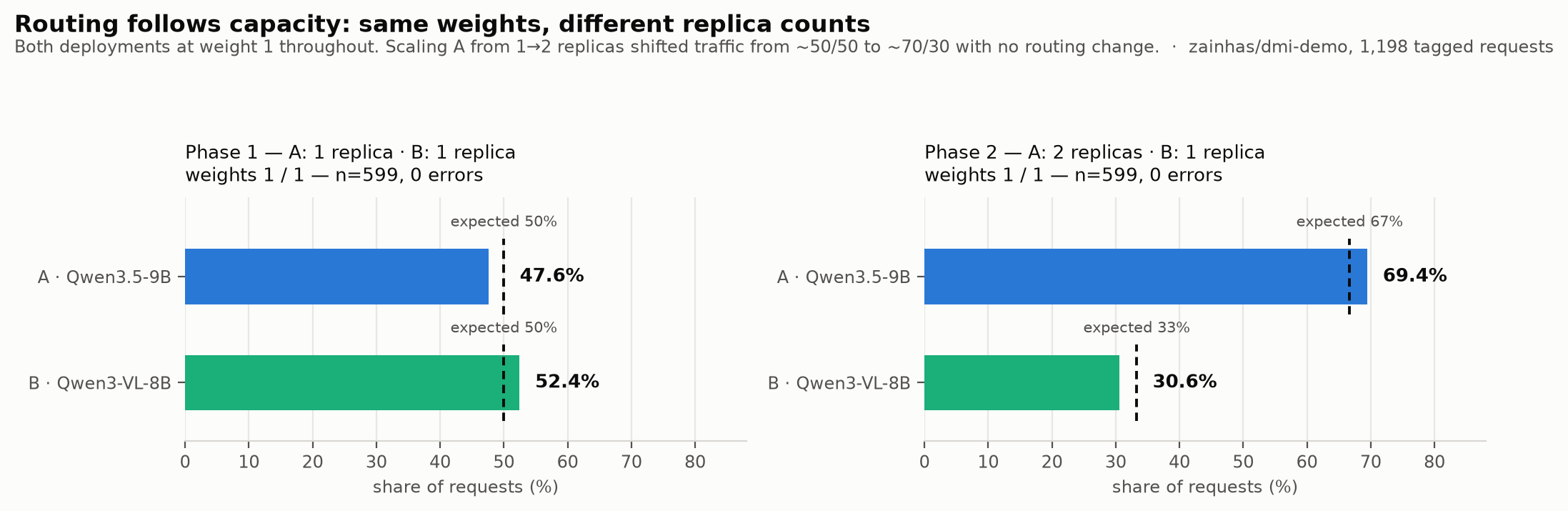
| Phase | Replicas (A : B) | Expected share | Measured share | n |
|---|---|---|---|---|
| 1 | 1 : 1 | 50 / 50 | 47.6 / 52.4 | 599 |
| 2 | 2 : 1 | 66.7 / 33.3 | 69.4 / 30.6 | 599 |
Because routing follows capacity which in turn followed the replicas. Within deployment A, its two pods each carried ~30–40% of total traffic (39.6% and 29.9%), the router balances across pods, too.
To make the profile tradeoff concrete, we swept the two certified profiles from our demo endpoint with one replica each, 60-second closed-loop levels at concurrency 4 / 8 / 16, 200-token generations, token counts taken from the API's own usage field:

| Profile | c=4 | c=8 | c=16 | TTFT p95 @ c16 |
|---|---|---|---|---|
| A · Qwen3.5-9B (BF16, TP1) | 362 tok/s | 789 tok/s | 1,464 tok/s | 368 ms |
| B · Qwen3-VL-8B (BF16, TP1) | 495 tok/s | 243 tok/s | 240 tok/s | 323 ms |
This table is the whole argument for measuring: B wins at low concurrency, then degrades sharply. A batches well with 4× the throughput from c4 to c16 with TTFT p95 rising only ~17%. B is faster than A at concurrency 4, then saturates: past c≈4 its effective request rate stops growing, aggregate throughput halves, and a few requests per minute begin to stall outright. If you'd only load-tested at concurrency 4, you'd have picked B for a high-concurrency workload and only found out about this behavior in production.
Neither profile is "wrong" they're just different points on the serving frontier, and profiles for your model will have their own curves. The starting configs give you a way to test starting points; a one-hour sweep like this one tells you which one fits your traffic.
Try it yourself!
The whole model, in five commands:
      # 1. Identity: who am I / what project
tg whoami

# 2. Pick a certified profile for your model
tg beta models public --product dedicated

# 3. One command: endpoint + deployment + traffic split + wait
tg beta endpoints deploy $MODEL --endpoint my-endpoint --traffic-weight 1

# 4. Call it — the qualified name is the model string
resp = client.chat.completions.create(
model="my-project/my-endpoint",   # the endpoint's qualified name IS the model string
messages=[{"role": "user", "content": "Hello!"}],
)

# 5. See what you built
together beta endpoints get $ENDPOINT_ID
From here, everything else in this series is one more deployment away.
📚 Docs: Dedicated Model Inference → Quickstart · Concepts · Route traffic






.png)




.png)
.png)






















.png)