
At cluster scale, GPU faults are a reality. An Xid error, a double-bit ECC error, a GPU falling off the PCIe bus or a flapping InfiniBand link can stall a distributed training job or take an inference replica down. Spotting that something is wrong is usually the easy part. The hard part is everything between the fault and a healthy node again
Earlier this year, we announced the launch of our fully Automatic node remediation features. Our GPU clusters customers and our internal Inference platform has been using this capability to help drive workload resiliency and minimize down time. Our customers love this capability, and we wanted to take some time break the system down and explain how it works and why we designed it this way.
We first implemented “Passive health” checks system, that watches every node continuously, both inside your VM and on the host underneath it. When a check finds a fault, auto repair recommends the lightest action to fix and shows you supporting evidence behind the recommendation. You decide up front, fault by fault, whether a repair waits for approval or runs on its own. You also decide how long auto repair waits for running workload to finish. Your own detectors can open repairs through the same pipeline by writing a single annotation on a node.
Availability
Generally available today: passive health checks, repair recommendations, the auto-remediation policy (including per-fault and per-node consent), wait-for-idle controls, the escalation ladder, the safety rails, and API and console repair.
Preview: node-label based remediation contracts, which let you bring your own detection systems such as NVSentinel or custom controllers.
We are constantly adding new detection signals and remediation actions to ensure maximum coverage and minimum time to recovery.
Why NotReady is not enough
Most node auto-repair keys on a single signal: the node went NotReady. That signal looks the same whether a node is broken or just briefly unreachable. When a storage or network event touches many nodes at once, every impacted node drops to NotReady. Our system has a circuit breaker built in to prevent mass replacement of nodes. NotReady also does not say why the node failed, so there's no basis for choosing between a reboot and a new machine.
So auto repair follows one rule: no node repair occurs without a failed health check behind it, and every repair carries its supporting evidence.
The pipeline
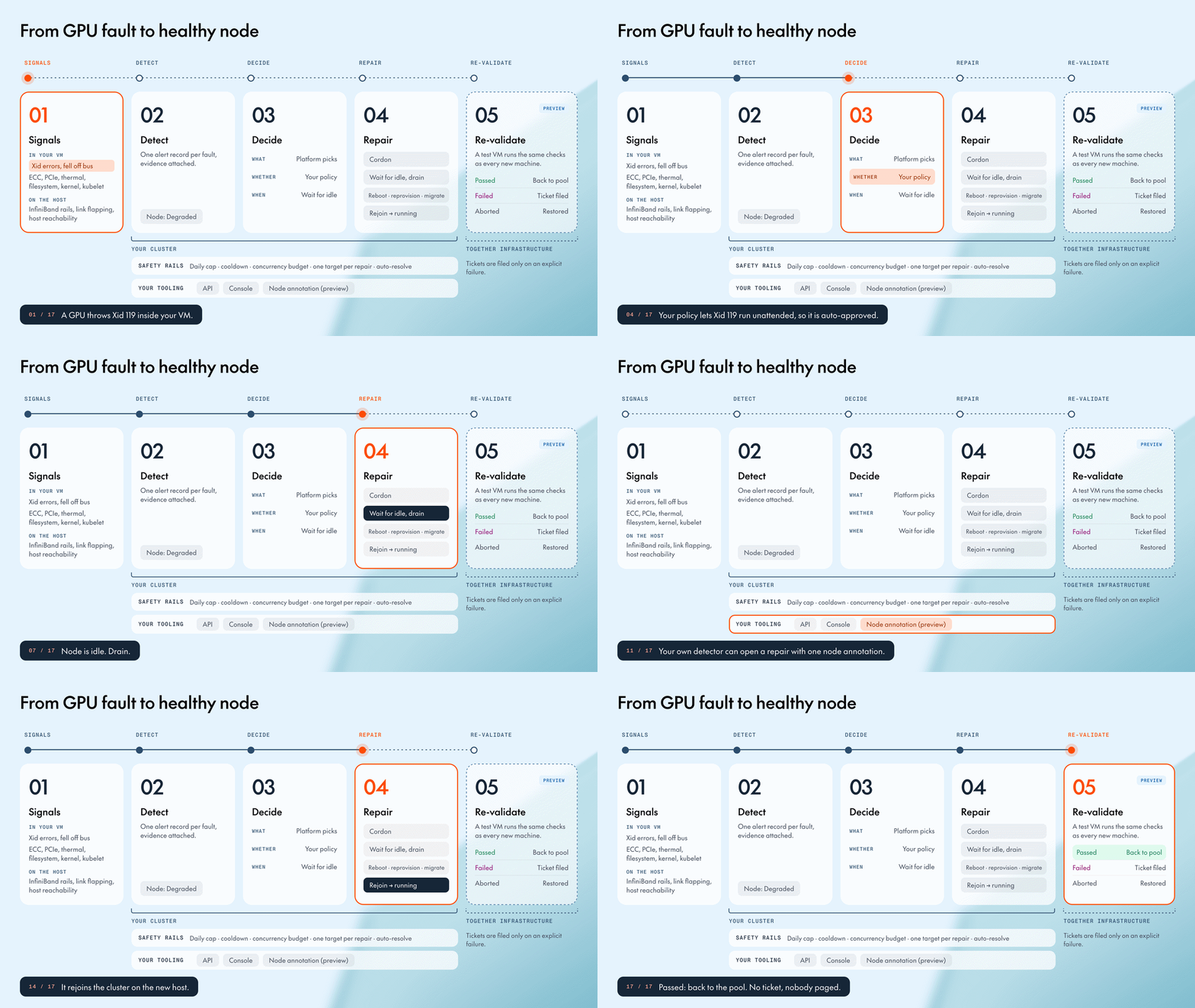
The pipeline has four stages: detect a fault, decide whether and when to act, repair the node, and re-validate the machine. The first three stages run against your cluster. The fourth runs on our side, on the physical host your node just vacated. Node-label requests from your own detection tooling enter at the decide stage and get exactly the same treatment as ours.
1. Detection from both sides of the hypervisor
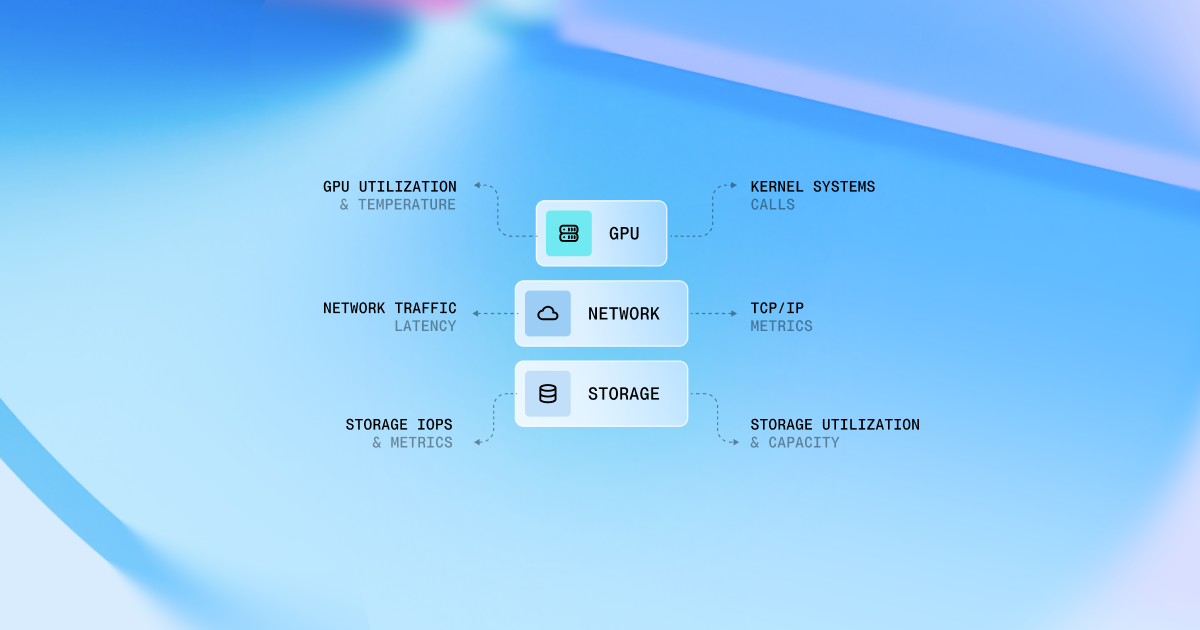
GPUs in Together GPU Clusters are passed straight through to your VM for bare-metal performance. That means GPU faults are visible from inside the VM, while host and fabric faults are visible from the host. Detection therefore runs on both sides of the hypervisor and lands in one place.
Inside your VM, exporters watch:
- the kernel log, for Xid errors and GPUs falling off the PCIe bus
- DCGM, for ECC double-bit errors, row-remap failures, PCIe replay rate, and thermal throttling
- Node Problem Detector, for read-only filesystems, XFS shutdowns, kernel deadlocks, and repeated kubelet or containerd restarts
On Slurm, an exporter reports nodes marked DOWN or DRAIN.
On the host, we watch InfiniBand rail state and link flapping, attributed to the VM that owns those rails. We also watch host reachability, so a dead host shows up as a problem on your node rather than as silence.
Every alert ships a stable summary, a plain-language description, and a machine-readable evidence payload. For an Xid, that's each code and its NVIDIA mnemonic. For thermal throttling, it's the peak temperature and throttle count. The control plane passes those strings through untouched, so the console, the API (as linked_alerts), and your notifications always say the same thing.
We keep observed separate from actionable. Every repair-relevant alert is recorded and marks your node Degraded. Only signals with an action mapping create a repair. Disk pressure, for example, shows up but doesn't trigger a reboot, because a reboot won't fix it. An alert with no mapping is counted and logged, never silently dropped, and routed to our support team for investigation.
2. Policy: we decide what, you decide whether and when
What is owned by the platform. Each signal maps to the lightest action that fixes it, so you never need to know which Xid means what:

Whether is yours to decide. In the Repairs tab, the Auto-remediation policy defaults to Approve before repair: every recommendation waits for a person, who can accept or override the action. You can switch the default to Fully automatic, but it isn't a blanket switch. The Repair actions checklist groups faults by the repair they trigger, and you select the ones you trust to run unattended. Inside the Xid group, you can set consent per code. A common setup auto-approves reboots for Xid 119 and 95 and keeps migrations gated. The Xid checklist also works under Approve before repair, if you want a short list of faults to run automatically while everything else waits for your review.
When is yours as well. A repair drains the node, so Wait for idle holds it until the node is actually idle. On Kubernetes, that means no running pod on the node is requesting a GPU. On Slurm, it means the scheduler reports no allocation on the node. Maximum wait bounds the hold, with a default of 2 hours and a cap of 24. Do not interrupt running jobs removes the bound entirely. Set the wait to at least your checkpoint interval. If the bound expires, the repair proceeds and the timeout is recorded.
Every repair records who requested it (Together Health Checker for automatic repairs), who approved it (a named user or Auto-Approved), which rule decided, and when.
3. Bring your own detector
Teams running large GPU fleets already have detection they trust: DCGM dashboards, NVSentinel, in-house scanners, job-level checks. Every repair, whatever its source, becomes the same record in our control plane. That gives capacity checks, audit, and safety rails exactly one home.
There are three ways in:
- API. Create a repair against an instance with a mode, an optional client-supplied ID for idempotency, and optionally the health check run or alert you're citing as evidence. You can also list, get, approve, reject, and cancel repairs.
- Console. The ⋮ menu on any node opens the Repair dialog with the detected issues and the recommended action.
- Node labels (Preview). Any detector with RBAC permission to write node metadata can open a repair by adding one annotation and one label to the node. The annotation carries the detector name, a stable request ID, the repair mode, when the fault was detected, and a human-readable reason.
Our cluster operator mirrors the node label up to the control plane. The repair is recorded with the detector as an external requester, so it's always attributable and can never impersonate a user. Detector name plus request ID is the idempotency key across the cluster, finished repairs included, so a detector that re-asserts the same fault on every scan can't reboot a node twice. Authorization is your cluster's own RBAC, with no API key and no onboarding ticket.
Annotation requests can ask for Reboot, Quick reprovision, or Migrate. Remove stays human-only. Like a console click, these requests skip the approval queue, but they still pass the same evidence gate, capacity check, and budgets as everything else. A per-cluster cap means a buggy detector causes limited damage rather than a catastrophe.
4. Repair actions and the escalation ladder
Every repair follows the same lifecycle: cordon, wait (per your policy), drain, act, rejoin. The console shows the node moving through Cordoning → Draining → Repairing / Migrating → Joining → Running.
The actions, from lightest to heaviest:
- Reboot. Restarts the VM in place. Local
/scratchand/tmpdata survive. - Quick reprovision. Rebuilds the VM from a clean image on a healthy host. Local data is lost.
- Migrate to new host. Rebuilds the VM on different hardware and sends the old host to re-validation.
- Remove. Pulls the node for RMA. Always human-initiated.
The same fix doesn't loop. If a fault comes back on the same machine after the same action has already run twice, the next recommendation moves one rung up. A third round of Xid reboots becomes a reprovision, and a third reprovision becomes a migration. The ladder is tracked per machine, cluster, alert, and Xid code. Attempts older than a week don't count, and neither do cancelled or self-resolved recommendations.

Migrations are evidence-gated. Migrate is the one action that consumes real capacity. It requires either a critical alert currently firing on the node or a critical alert on the same machine within the last ten days. A request that meets neither condition runs as a Quick reprovision instead.
Host power cycle (Preview). Some faults, Xid 79 among them, need the GPU to lose power, which a VM reboot can't do even though the hardware may be fine. Rather than consuming a new host, we can power-cycle the one you're on. No BMC credentials exist anywhere in the system. A boot-ID check prevents a retry from cycling a host that has already come back.
Clusters that need a guaranteed replacement window can reserve hot spare capacity, so migrations draw from that reserve rather than general availability. Ask your account team for details.
5. Rails that assume the alert storm will happen
A bad driver push, a storage outage, or a network partition can make dozens of nodes look sick at once. Node-level repair can't fix a cluster-level cause, so the rails are layered and independent:
- Persistence. A signal must hold for a per-signal duration before it becomes a recommendation.
- Cooldown. After any repair, a node gets roughly 30 minutes before a new recommendation can be generated.
- Concurrency budget. The budget is sized from cluster node count, and the operator runs one repair per node pool at a time.
- Circuit breaker. When one cluster generates a burst of correlated automatic repairs, the breaker trips. Many nodes failing at once points to a cluster-level cause, and repairing nodes one by one will not fix it.
- One target per repair. The schema enforces it, so a bug can't fan out across nodes.
- Auto-resolve. A recommendation whose alert clears before anyone acts disappears on its own.
The control plane is replicated, and every write is idempotent and checked against the state it expects. Two replicas racing on the same node produce one repair, not two.
6. The machine re-validates itself
When a node migrates off a machine, or is removed from one, that machine shouldn't go straight back into the pool, and it shouldn't sit in a queue waiting for someone to read diagnostics either. As soon as the old VM is gone, the machine moves into validation automatically. A test VM runs the same GPU, NCCL, InfiniBand, and storage checks that every brand-new machine passes before joining the fleet. No person touches the machine between your node leaving and the verdict landing.
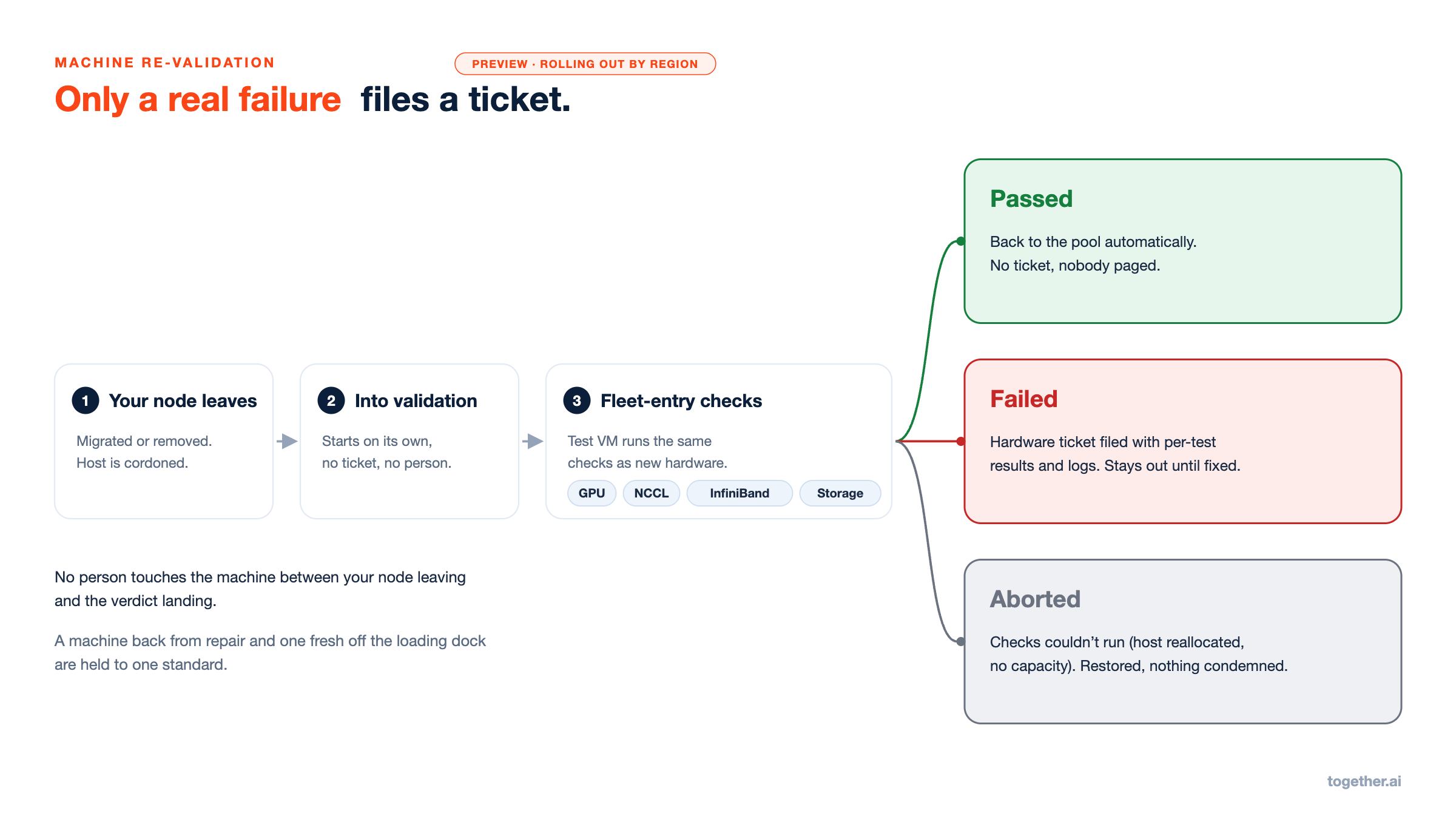
There are three verdicts:
- Passed. The machine returns to the pool. No ticket is filed and no one is paged, so a transient fault stays transient.
- Failed. A hardware ticket is filed automatically with per-test results and logs attached. The machine stays out until it's fixed and passes again.
- Aborted. The checks couldn't run, for example because the host was reallocated or the test VM couldn't be placed. The machine is restored to its prior state, and nothing is condemned.
Only an explicit failure produces a ticket.
Built to extend past one accelerator
Repair decisions key on alerts, nodes, and machines, not on the GPU vendor. The GPU type matters for placement and capacity, but recommendations, policy, escalation, budgets, triggers, and re-validation don't special-case it. The vendor-specific parts are detection (the Xid and DCGM exporters) and the diagnostic battery. Bringing up a new accelerator means adding those pieces, and everything downstream carries over.
Using it
Open your cluster in the console and go to the Repairs tab. Pending recommendations and history are there, with the Auto-remediation policy at the top. Each remediation in the API carries its linked_alerts, so your own tooling sees the same evidence the console does.
What's next
- NVSwitch coverage. SXid faults, coalesced per node, with readable descriptions.
- Status back on the node. Repair progress written back as node metadata, so external detectors can close the loop where they opened it.
- One health surface. Click from a failed check to the repair it caused and back, plus a per-node view of health, events, and repair history.
Tell us what fails on your clusters that we don't catch yet. That list drives what we build next.
-> Get started in the console
-> Docs: Node repair · Health checks

.png)






.png)
