
How do you choose the right open model for your workload?
With over 2 million open models on Hugging Face, it’s hard to know which one is best for any specific task. There are countless leaderboards and benchmarks comparing dozens of models, and noteworthy new releases practically every week. How can anyone possibly know which model they should use, or how to even begin the selection process? Why choose an open model?
Why choose an open model for your workload?
There are many reasons why choosing an open vs. closed model makes sense for enterprise tasks, including transparency, adaptability, and control.
Open models are transparent because details of their weights, training data, and architecture are known, making them fitting candidates for introspection and analysis into their decision making. Transparency helps identify the sources of issues like overfitting and bias, which can help organizations gradually increase confidence in AI decision making over time if choosing to adapt the model.
Open models are adaptable because fine-tuning techniques from the research community can be applied. Proprietary adaptation methods for closed models may not provide the same level of customization or alignment as a collection of open post-training approaches, which might include supervised fine-tuning (SFT), direct preference optimization (DPO), and reinforcement learning (RL).
Finally, open models provide an additional level of control to organizations. Open models can be run anywhere and are not tied to any proprietary architecture or stack. This enables your team to innovate upon open community research, maintaining full ownership and auditability over the model artifacts created along the way. When you own your AI, you’re more invested in building for the future needs of your organization.
Legal considerations for open models
Some open models have strict licensing requirements that disqualify them from commercial or production use. For some companies, this means only using models with Apache-2.0 or MIT licenses. For others, it could mean only using models made in the U.S. or France. Be sure to consult with your legal team before starting your model selection process, because this will limit the field of candidate models to consider. There is a table in the next section with relevant information about licenses and region of origin. The Llama license is the most restrictive, but all are generally permissive for commercial purposes.
Closed vs. open models: Task comparison
It’s common to begin the model selection process with experience using proprietary models like GPT-5, Claude Opus, or Gemini 3. These providers typically offer three tiers, trading off speed and cost versus capability (e.g. GPT-5 pro, GPT-5 mini, GPT-5 nano). We will refer to these three tiers as low, medium, and high, suggesting similarly capable open models to try. The low tier is the cheapest, fastest, and least capable, whereas the high tier is the most expensive, slowest, and most capable.
Model size & capabilities
- Here are some rough guidelines to help narrow down your model selection by parameter size based on current performance of closed-model systems. If the task requires the closed model to be from the high tier, the open model equivalent should be at least 300B total parameters.
- For the medium tier, the open model should be between 70 and 250B total parameters.
- For the low tier, the model should likely be <32B total parameters. After fine-tuning, there are instances where an even smaller model can be used — but this is not always the case. These are simple guidelines to use as a starting point, and proper evaluation is still required.
The following model families are recommended for general-purpose evaluation versus proprietary models:
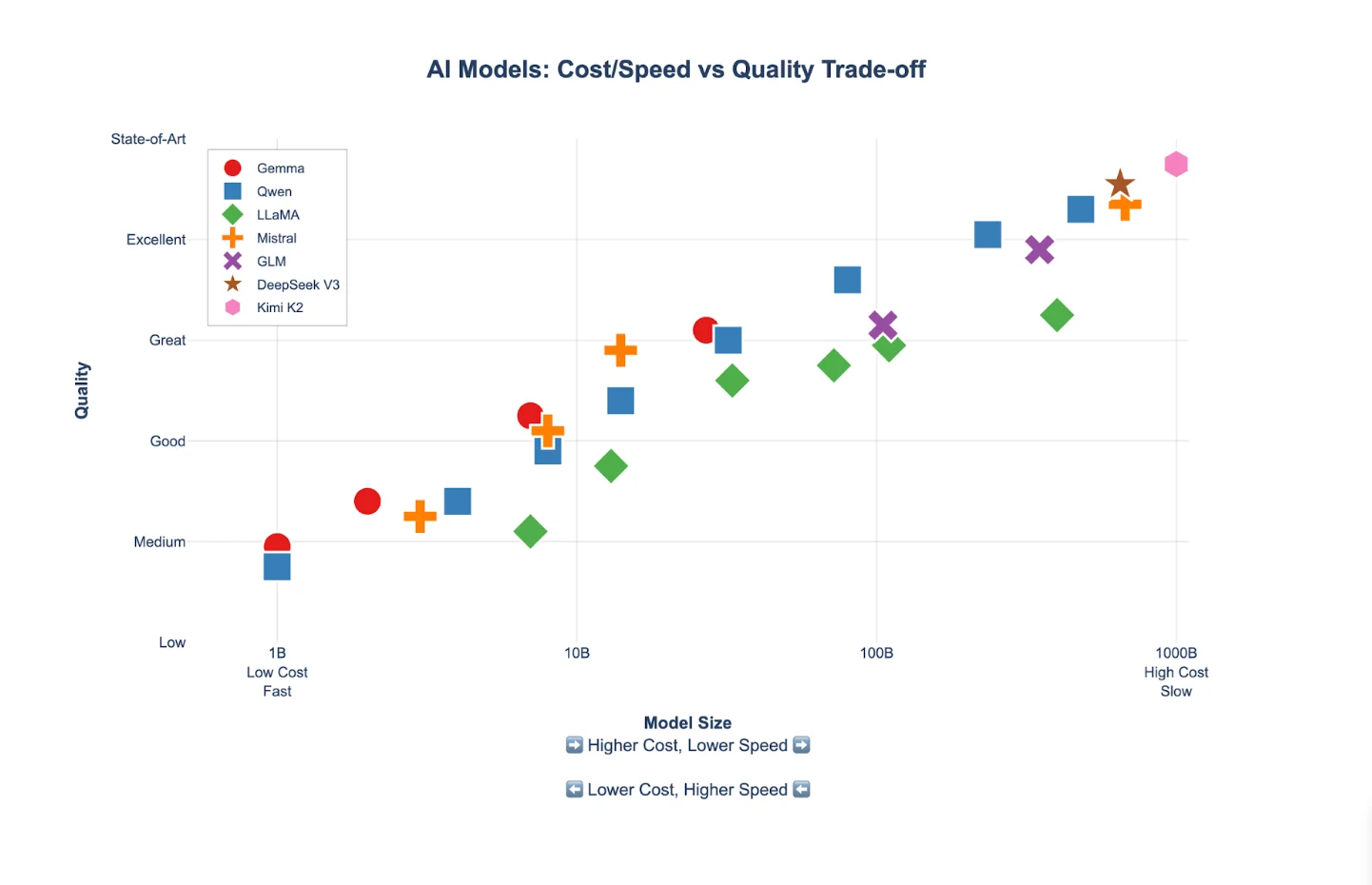
Plotting model quality versus parameter size gives us a clear view into the performance of each model family at its various available parameter sizes.
Tradeoffs to consider during model selection
When choosing a model, there are three main dimensions: cost, speed, and quality. Cost and quality are directly related, and are determined primarily by the size of the model. The larger the model, the higher the expected quality of its output, and the more expensive it is to run. Speed is inversely proportional to quality: the higher the quality, the lower the speed. For instance, here are three different potential configurations for the same task:
- Deepseek-v3.2
- Running on 8x GB 200s (most costly, $$$)
- Max load: 2 RPS
- 99% accuracy
- Qwen3-Next-80B-A3B-Instruct
- Running on 4x H200s (good price-performance mix, $$)
- Max load: 10 RPS
- 96% accuracy
- Ministral-3-3B-Instruct-2512
- Running on 2x H100s (Fast, but lower accuracy and cost, $)
- Max load: 20 RPS
- 94% accuracy
The best option for you depends on your requirements for quality, cost margins, and throughput. It’s worth taking the time to thoroughly define these requirements; they will be instrumental in guiding your selection.
Evaluating the model
While a given model might have published academic benchmarks, both your data and task are likely to be unique. Success in AI initiatives requires disciplined experimentation and a clear understanding of the metrics you’ve chosen to represent performance. Techniques like LLM-as-a-judge evaluations enable a better approximation of performance on famously difficult- to-evaluate LLM tasks, like numerical scoring, classification, and open-ended comparison. Other tasks, like reranking, can be evaluated with traditional ML metrics like accuracy, precision, and nDCG. To set yourself up for success, ensure you’ve done the work to understand what these metrics mean, select the appropriate ones for your use case, create a golden dataset, and gain confidence in how to run those evaluations before directly evaluating models. This delivers clarity now and saves time later.
For most use cases, the minimum viable LLM should be used to ensure high cost margins, low latency, fast generation speeds, and acceptable quality. Analyzing the failure modes of the system is a virtuous cycle: discover issues, make changes, re-run evaluations, and repeat.
Here’s the painful truth: when evaluating the output, some level of manual review is still necessary. It can be tedious, but the benefits are worth the time commitment. Manual review gets you closer to understanding the real ways the model fails, and will ultimately be the fastest way to determine the model’s quality. It also helps you uncover blind spots in your evaluation process.
The simplest system for doing evaluations is:
- Review traces
- Cluster common failures into groups
- Keep going until 100 samples are labeled as pass/fail
- Modify prompt to fix most prominent errors (providing positive and negative examples)
- Repeat, ideally using automated methods
Here are some helpful tips:
- Be sure to use a representative set of samples so the failures are also representative of the likely errors to occur.
- Be sure to do the first pass manually to gain real experience about how the system is failing.
- After manual review, consider developing a rubric indicating what conditions would make the response pass/fail. The failure modes identified earlier should be mentioned in the rubric. For example, if the query mentions X and the model doesn’t do Y, then this is a failure. A few examples can be included in the prompt to further guide the model about what is considered passing and failing. Guiding the model to output JSON makes it easy to aggregate results at the end.
- Automated LLM-as-a-judge evals can be done through the Together platform — see more here.
Fine-tuning for last-mile task adaptation
One major benefit of open models is their potential to be improved if they are fine-tuned for a specific use case. Sometimes, you’ll discover a fast model that is very close in quality for most tasks, but too deficient in others to adopt in production. Fine-tuning or preference optimization may be your solution, as you’re creating a servable artifact attuned to your data and task. This is especially compelling if you already have logged conversations or other production data. The investment in most LoRA SFT fine-tuning experiments is relatively small, and running many experiments with both LoRA and DPO are supported on the Together AI platform today.
FAQ
We’ve discussed many important topics to consider when evaluating open models. Open models are incredibly powerful due to their cost, broad community support, and adaptability through fine-tuning and other model shaping techniques.
Why should I select an open model for my workload?
Open models offer transparency, adaptability, and control.
What legal considerations are relevant when selecting an open model?
The license of the model and its country of origin are examples of legal considerations you may encounter during model selection. Ensure you’re aware of any internal licensing or provenance requirements.
How do I select a model for a specific task?
The table earlier in this post includes a comparison across low, medium, and high parameter count models. Remember the tradeoffs involved: large models are generally smarter but slower, and cost a bit more. Smaller models are usually less capable but significantly faster and cheaper.
How should I evaluate open-source models?
While academic benchmarks are helpful to generally describe a model’s capabilities in some domain or task, understanding what metrics apply to your successful outcomes is the first and most important step. Understand the use case and the metrics that commonly apply to it, and become comfortable regularly running those evaluations and parsing their results.
How can I adapt a model to get better at a task?
Fine-tuning techniques such as LoRA SFT, full fine-tuning, or direct preference optimization can guide a well-performing model to cover gaps in performance. Existing evaluation processes make fine-tuning very powerful, because you can quickly test model quality with a held-out dataset.